Replacing Words
Replacing words is a relatively easy process but slightly different from the standard replacements. However, in this example we have added another checkbox (Space After Replace). This checkbox allows you to add a space after your replacement word so that it isn't packed up on the next word. Sometimes there may be need to do that if replacing words like (anyone) if you made a spelling error, let's say (anuone).
So, let's see how we can utilize these functions. First we are going to use a testing phrase (I looked out the window and it was a very dreary and rainy day.) In this case we will not need the checkbox (Space After Replace).
1. In the example text area going to write ("rainy day") without quotation marks.
2. In the replace text box I'm going to add (storm night).
3. In the testing area I'm writing (I looked out the window and it was a very dreary and rainy day.)
4. Next, click the "Generate Regex" button and then "Test Removal" button.
5. Results: I looked out the window and it was a very dreary and storm night.
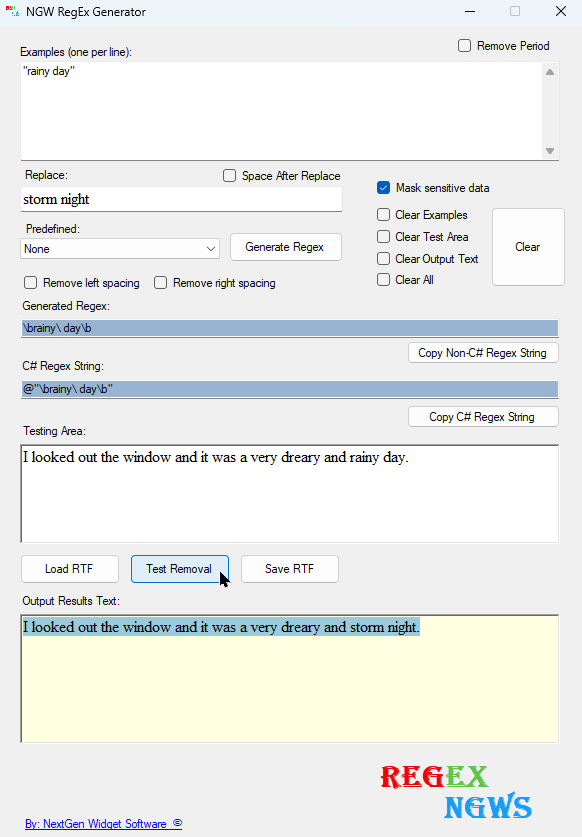
NOTE: In order to effectively replace these words your example text should be in quotation marks for phrases. In some cases it will work without the quotation mark but in this example if you do not use the quotation marks the period at the end will be removed.