General Operations
So now let's get started with some basic functionality. Here were going to remove some characters from a strain.
|
|
|
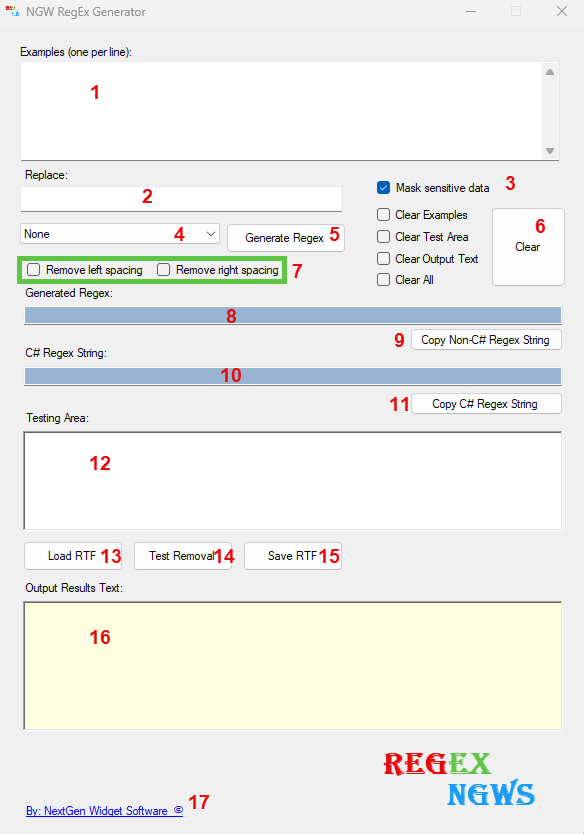
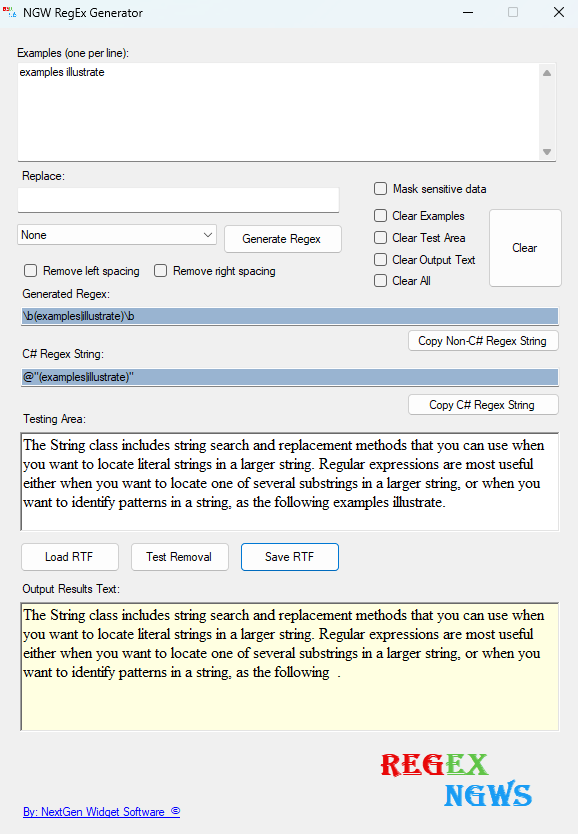
1. First let's add some tax to the test area text box. The String class includes string search and replacement methods that you can use when you want to locate literal strings in a larger string. Regular expressions are most useful either when you want to locate one of several substrings in a larger string, or when you want to identify patterns in a string, as the following examples illustrate. 2. Now, I want to remove "examples illustrate" from the end of the paragraph and I also want to remove the spacing to the left so that the period sits directly after the word following. 3. In the example box (1) I will put "examples illustrate" on the first line without quotation marks and click the "Generate Regex" button (5). The generate button gives you the RegEx code for general observation (8) and also the C# code (10) to use in your application. 4. Now, let's click the "Test Removal" button and you'll see the "examples illustrate" Results: The String class includes string search and replacement methods that you can use when you want to locate literal strings in a larger string. Regular expressions are most useful either when you want to locate one of several substrings in a larger string, or when you want to identify patterns in a string, as the following .
|