Expression Development
One of the neat features of NGW RegEx Generator is that it gives the C# string of the expression that can be used so that a developer can easily incorporate the expression into their application.
So, for example if we have some (random text that we want to utilize and remove a string or even one word) we can easily do it and get the regular expression right from the application. Let's see how this is done.
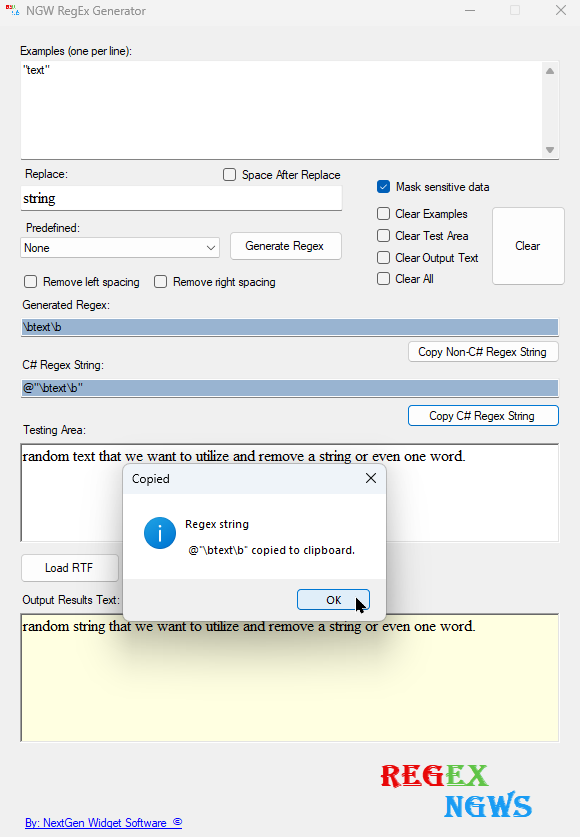
1. Let's enter some text into the testing area, (random text that we want to utilize and remove a string or even one word).
2. In this example were going to replace the word "text" with the word "string". The word "test" should be in quotation marks.
3. In the examples text box let's add the word "test" and in the replace text box let's add the word "string".
4. Click the "Generate Regex" button and the generated C# code string is easy to see. However, we need to first test to make sure the string actually works by clicking the Test Removal button.
5. Now just click the "Copy C# Regex String" button.
Results: @"\btext\b"
Now it's up to the developer to write the code.
Example:
// Replace "text" with "string" regular-expression.
string strInputText = "random text that we want to utilize and remove a string or even one word.";
string strPattern = @"\btext\b"; // Matches the word "text" as a whole word.
string strReplacement = "string"; // Replace "test" with "string"
// Perform the replacement
string result = Regex.Replace(strInputText, strPattern, strReplacement);
// Display the result
MessageBox.Show(result,"RegEx Results", MessageBoxButtons.OK, MessageBoxIcon.Information);
return;
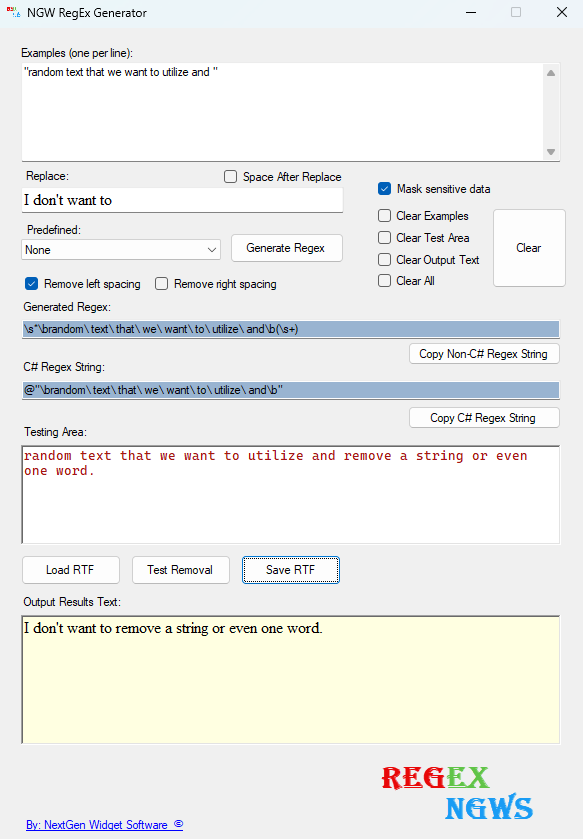
Longer strings are treated the same way placed in quotation marks and it is case-sensitive.
// Replace a string, regular-expression.
string strInputText = "random text that we want to utilize and remove a string or even one word.";
string strPattern = @"\brandom\ text\ that\ we\ want\ to\ utilize\ and\b"; // Match words.
string strReplacement = "I don't want to"; // Replace with.
// Perform the replacement.
string result = Regex.Replace(strInputText, strPattern, strReplacement);
// Display the result.
MessageBox.Show(result, "RegEx Results", MessageBoxButtons.OK, MessageBoxIcon.Information);
return;